 MrGripper
The short answer
MrGripper is free to download. The free tier covers the whole training loop — unlimited workouts, per-hand logging, dynamometer grip tests, 3 routines, 5 pieces of gear, and 30 days of history. Pro ($4.99/month or $29.99/year, with 3 days free on monthly) adds per-equipment and per-load PRs, unlimited routines, full history, equipment photos, and CSV export.
What you get for free
The free tier isn't a trial with a timer on it. It's the app:
- Unlimited workouts and custom exercises. No session cap, no "3 logs per week" wall.
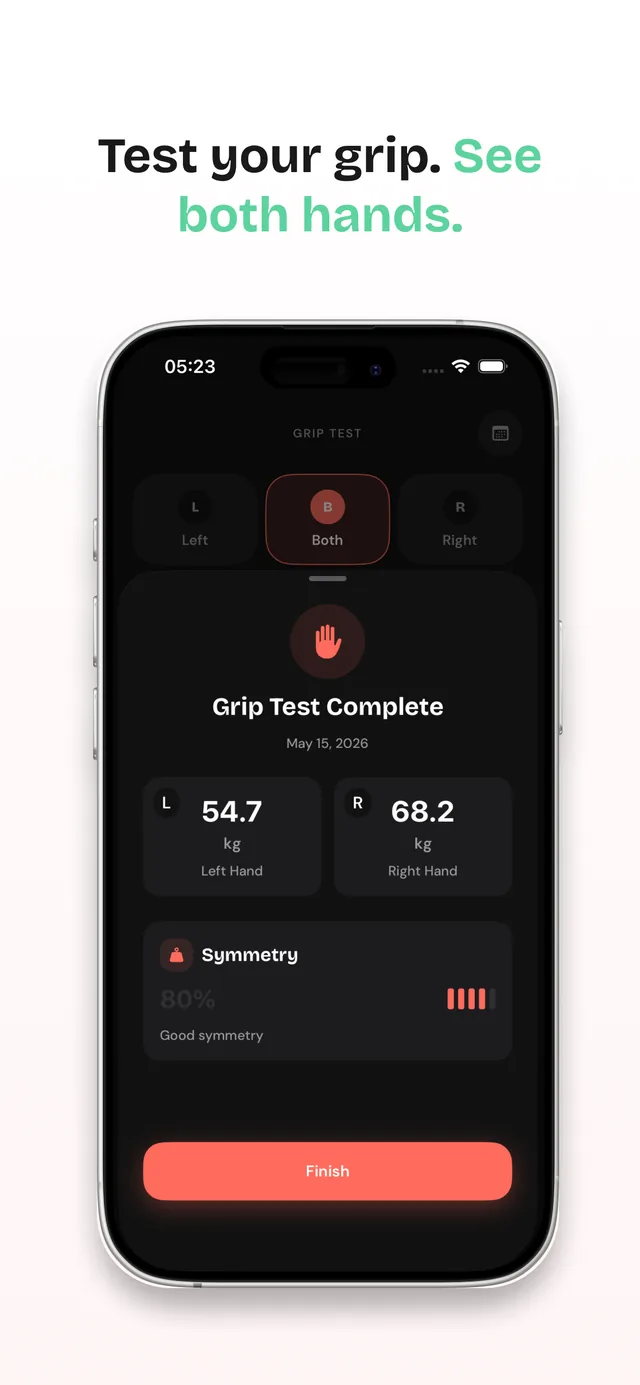
- Full per-hand tracking. Every set logged left and right, with the left–right symmetry score on your dashboard. This is the thing generic gym logs can't do — they merge both hands into one number and hide imbalances until they hurt.
- Dynamometer grip tests. Measure left, right, or both hands and get a clear summary. Works with any dynamometer you already own — no proprietary Bluetooth hardware, no pairing. New to testing? Start with how to test grip strength at home.
- Guided workouts. Press play on a routine and get count-ins, live rep and hold screens, rest timers, and PR reveals at the finish. Every set saves the moment you log it.
- The built-in hold timer for dead hangs, static holds, and endurance work.
- 3 saved routines, up to 5 pieces of equipment in your gear library, weekly insights, and a 30-day history window.
- Offline-first. Your training data lives on your device, and no connection is required to log or review it.
If that covers how you train, stay on free. Seriously — it's built to be usable, not to nag you.
What Pro adds
Pro doesn't give you more training. It gives you more memory and more resolution:
| Feature | Free | Pro |
|---|---|---|
| Workouts & custom exercises | Unlimited | Unlimited |
| Per-hand logging & left–right symmetry | Yes | Yes |
| Dynamometer grip tests (left, right, both) | Yes | Yes |
| Guided workout player, hold timer, PR reveals | Yes | Yes |
| Offline-first logging | Yes | Yes |
| Gear library | Up to 5 pieces | Unlimited |
| Saved routines | 3 | Unlimited |
| Training history | Last 30 days | Everything, no cutoff |
| Insights windows | 7-day and 30-day | Adds 90-day |
| Grip-test insights windows | 7-day and 30-day | Adds 90-day |
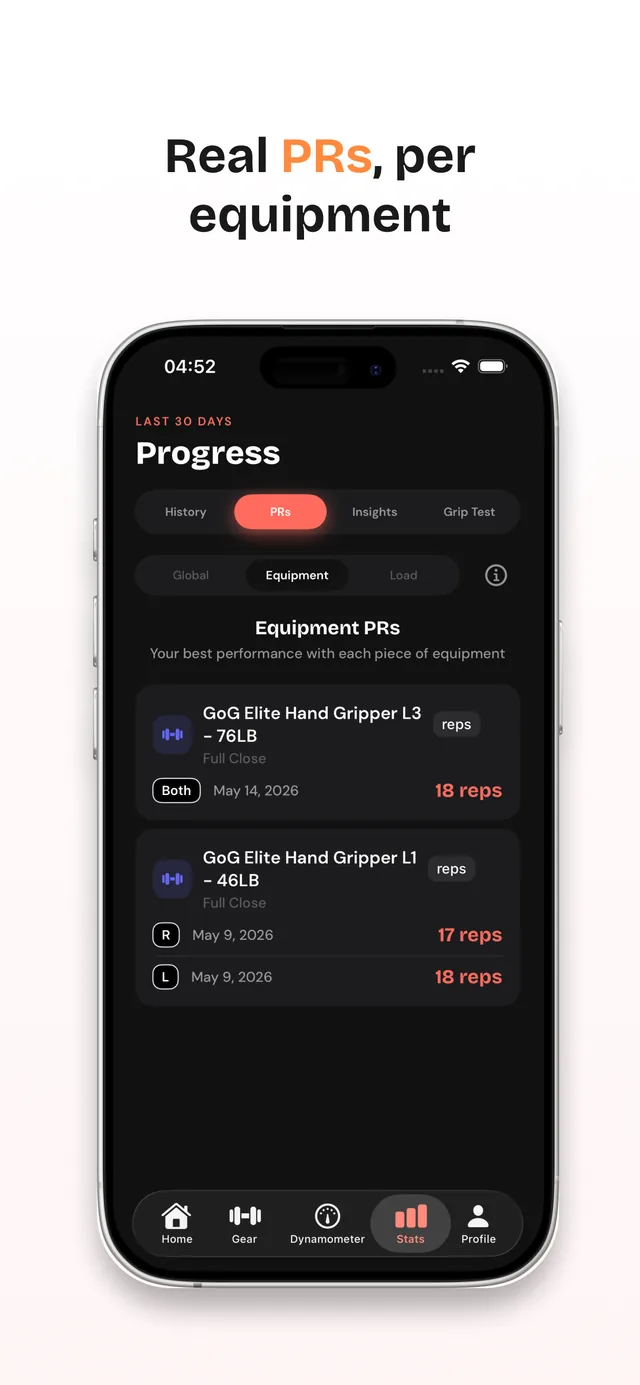
| Personal records | By exercise | Adds per equipment and per load |
| Equipment photos | — | Yes |
| CSV export | — | Yes |
When does upgrading to Pro actually pay off?
Not on day one. Here are the five moments when the free tier starts costing you information — pick the one that's already true for you.
1. It's day 31
This is the most predictable trigger. On free, your history goes back 30 days — and it's a hard cutoff, not a lazy scroll: sessions older than a month aren't loaded at all. On day 31 your first month starts dropping off the end, including the baseline dynamometer numbers you'd most want to measure against. Pro removes the cutoff entirely and adds a 90-day insights window on top of the 7-day and 30-day views you already have, so you're comparing training blocks instead of single weeks. If you've been training consistently for a month, this is the upgrade.
2. You train more than one gripper, edge, or tool
Free tracks PRs by exercise — one best per movement. Pro adds a per-equipment scope, so a rep record on a #2 gripper and a rep record on a #2.5 are two different records, not one blurred line. The same goes for a 20 mm edge versus a 15 mm edge, or two different pinch blocks. If you own a progression of gear, per-equipment PRs are the difference between "I got stronger" and "I closed the #2.5 for the first time."
This is also where the free gear library fills up. Free holds 5 pieces of equipment; a gripper progression reaches that on its own before you've added a hangboard or a pinch block. Pro removes the cap.
3. You've started adding load
Weighted hangs, pinch blocks with plates, loaded carries. Pro adds a per-load scope, so a bodyweight 20 mm hang and a +10 kg 20 mm hang are scored separately. Without it, adding weight makes your PR history less informative, not more — your best hold time drops and the app can't tell you why.
4. You need a fourth routine
Three routines go a long way — a gripper day, a hang day, a support-and-carry day. If you're periodizing — a strength block and a volume block, or separate climbing and BJJ routines — you'll hit the ceiling. Pro is unlimited.
5. Someone else needs your numbers
Coach, physio, or your own spreadsheet. Pro exports your training data to CSV. If you're in rehab and tracking symmetry back toward baseline, or you run your own analysis, export is the feature you'll use every week and the one you can't work around.
When not to upgrade
If you train one gripper, log a couple of sessions a week, and never look further back than last month — free is genuinely the right tier. Nothing in the app degrades if you stay. Come back to this page on day 31.
What MrGripper Pro costs
| Plan | Price | Effective monthly | Free trial |
|---|---|---|---|
| Monthly | $4.99/month | $4.99 | 3 days free |
| Yearly | $29.99/year | $2.50 | — |
Yearly works out to about half the monthly rate — $29.99 against $59.88 for twelve monthly payments, a saving of $29.89 a year.
The free trial is on the monthly plan. That's the honest way round it: try Pro for 3 days at no cost, and if it earns its place, switch to yearly for the cheaper rate. You can change plans any time in Settings → Apple ID → Subscriptions.
New subscribers are eligible for the trial, and the App Store shows your exact terms and the price you'll be charged before you confirm. It's an auto-renewing subscription: it renews unless you cancel at least 24 hours before the period ends, and you can cancel any time in the same place. Full details are in the terms of use.
How to upgrade
- Download MrGripper free from the App Store.
- Train on the free tier. Genuinely — the upgrade decision gets easier once you have data.
- When you're ready, tap the crown on your Home dashboard, or open Settings and choose the upgrade card. If you hit a limit while training, the app offers the upgrade there and then — and picks up whatever you were doing once you're through, so you don't lose the routine you were saving.
- Start the monthly plan to get the 3 free days, or go straight to yearly if you've already decided.
Pro is an in-app purchase, so you can't buy it from this website — it's bought and managed through your Apple ID, which means one subscription covers your iPhone, iPad, Mac, and Vision Pro.
Start free — decide later
You don't need Pro to start training your grip with real numbers. Download MrGripper, log a month, and let your own data tell you whether the upgrade is worth it.
FAQ
Is MrGripper free?
Yes. MrGripper is free to download and the free tier has no session limits — unlimited workouts and custom exercises, full per-hand tracking, dynamometer grip tests, guided workouts, 3 routines, up to 5 pieces of equipment, weekly insights, and 30 days of history.
MrGripper Pro is an optional subscription at $4.99/month or $29.99/year.
Does MrGripper Pro have a free trial?
Yes — 3 days free, on the monthly plan. The yearly plan doesn't include a trial, so if you want to try before paying, start on monthly and switch to yearly later for the cheaper rate.
New subscribers are eligible; the App Store confirms your exact terms and the price after the trial before you commit. Cancel before the trial ends and you're not charged.
What happens to my data if I cancel Pro?
Nothing is deleted. Your training data lives on your device, so canceling doesn't remove logs, grip tests, or PRs.
What changes is what's shown: history goes back to the 30-day cutoff, insights drop the 90-day window, and the per-equipment and per-load PR scopes lock again. Resubscribe and all of it reappears — the numbers were never gone, just filtered.
Routines are the exception, and it works in your favour: if you built more than three on Pro, you keep them. You just can't create new ones until you're under the limit or back on Pro.
Do I need a Bluetooth dynamometer to use MrGripper?
No. MrGripper works with any dynamometer or gear you already own — you enter readings manually. It doesn't connect to smart or Bluetooth devices, which means it isn't tied to one manufacturer's hardware. More on training without a Bluetooth dynamometer.
Can I buy Pro on the website?
No. Pro is an in-app purchase through the App Store, so you subscribe inside the app and manage it through your Apple ID.
Which devices does Pro work on?
Anywhere MrGripper runs: iPhone and iPad (iOS/iPadOS 18.0 or later), Mac (macOS 15.0 or later on Apple Silicon), and Apple Vision Pro (visionOS 2.0 or later). The interface is available in English, German, Russian, and Spanish.